

The replacement PCBs have arrived and they look good :)
I now have the replacement PCBs from circuits.io and they look great. Â They also included some free PCBs, so hopefully they will work. Â 🙂
I’ll post some pics when I have some
It’s alive!
I spent a little time on my lunch break putting in the last few wires and the board has come up 🙂
The flash from my phone has drowned out the LEDs on the board, but they were blinking as they should.


Since I didn’t have another voltage regulator handy I have used the voltage drop across two diodes from a bridge rectifier (a trick I’ve used successfully before with other 3.3v parts from Microchip).
Some more pictures of the failed boards
I took a few more pictures of the failed boards and sent them to the fantastic people at circuits.io.  They have very generously offered to send me new ones at no charge 🙂  Hopefully these new boards will work out.


I also had a quick go at getting one of the boards working. Â After soldering lots of wires on the bottom of the board I powered it up and let the magic smoke out of my voltage regulator, so it looks like I may have a crook connection somewhere. Â It could also be because I didn’t have the right regulator available so tried another with a slightly different pinout. Â I put some heat shrink over the input lead and bent it into the right position. Maybe I didn’t get it quite right. Â The interesting thing is that the Mac I had it plugged in to didn’t complain about the device drawing too much current, so I don’t quite know what went wrong. Â Time to head out to Jaycar and get the part I actually need I guess 😉
My PCBs have arrived
Unfortunately they don’t appear to have worked out as well as I was hoping.
On the top side many of the tracks are incomplete, while the bottom side has no tracks whatsoever 🙁
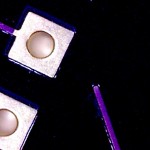

The boards look really nice though. Â I’m going to have a go at making one of them work soon as I have a problem that needs to be solved using them.
Toilets
Over the weekend I replaced the leaking inlet valve of our toilet. What should have been a 5 minute job took a couple of days as whoever installed it in the first place glued the nut joining the inlet pipe to the inlet valve. This meant that I had to cut the inlet valve out once I had managed to snap things off badly inside the cistern. No going back once I had snapped a couple of the plastic bits on the inside. Once I got it out I was able to replace it in a matter of minutes 🙂
I’ve ordered my first PCB :)

I’ve been playing with circuits.io and have decided to order a couple and see how it goes 🙂 Hopefully they should be here in a few days/weeks.
Strange smells
A while ago I came home to a strange smell in the house, then a little while later I found this!

SVG
I’ve been looking into making some software with my daughter. She wants to make a game with some characters she has drawn, so I need a nice way to render them. I want to make them using vector graphics, but iOS doesn’t really have a nice way of doing that. What I am in the process of doing is making a little command line tool that converts SVG files into CoreGraphics calls.

The code can be found here on github

This is a sample of the output of the tool. I have seen several other tools that convert the SVG paths to CoreGraphics calls, but nothing that will actually render the whole file including colours and fills. It is still very rough and doesn’t handle things like gradient fills, but for a quick hack it is working pretty well.
Success!
Time for bed. Â I’ve successfully hacked an app I need for work to do something it is not supposed to do 🙂 Â A little reverse engineering, byte patching and single stepping through machine code and I now have it being quite naughty 🙂